






RS232 / TTL Serial Camera Module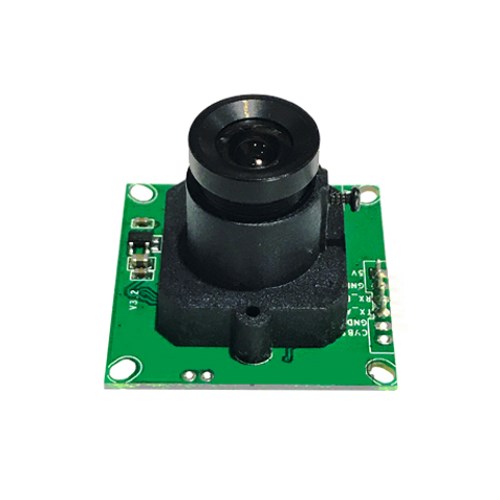
Description :
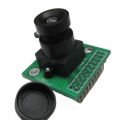
RS232/TTL Serial Camera module is new generation of serial camera module, which can be used to snapshot high-definition image through serial interface. Serial camera module get JPG image through a serial port, so this module can be easily integrated into the some device, and let the equipment device has image snapshot function.
We suuply RS232/TTL, so please choose the interface you need and we will ship RS232 by default if you do not make choice.
Characteristic :
1、Module Size: 32mm x 32mm
2、Optical Format: CMOS 1/4 inches
3、Image Pixels: 30 ten thousand
4、Pixel Size: 5.6um x 5.6um
5、White Balance: Automatic
6、Exposure: Automatic
7、Gain: Automatic
8、Shutter: electronic rotating shutter (ERS)
9、Output Format: JPEG / M-JPEG
10、Signal to Noise Ratio (SNR): 45DB
11、Dynamic Range: 60DB
12、Maximum Analog Gain: 16DB
13、Scan Mode: progressive scan
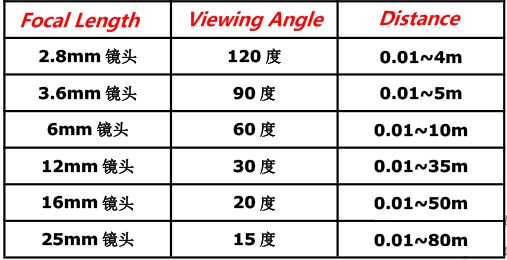
14、Viewing Angle: 90 degrees with 3.6mm Focal Length by default (Optional)
15、Monitoring Distance: 0.01~5m (Adjustable)
16、Image Size: VGA (640*480)、QVGA (320*240)、QQVGA (160*120)
17、Analog video output frame rate: 640*480 30fps
18、Infrared night vision interface: reserved
19、Analog Video Interface: CVBS TV OUT (reserved)
20、Support simulation video output.
21、Interfaces: RS232、TTL
22、Serial port Rate: 38400 by default (9600、19200、57600、115200)
Electronical Parameter :
1、Working Voltage: DC +5V.
2、Working Current: 75mA
3、Working Current (Infrared lamp work): 250 MA
4、Infrared night vision: 850 NM infrared lamp
5、Work Environment Temperature: -20 ~ + 60 ℃
6、Work Humidity: 20% ~ 80% PH
7、Cameras working current: 80-100 MA.
Interface :
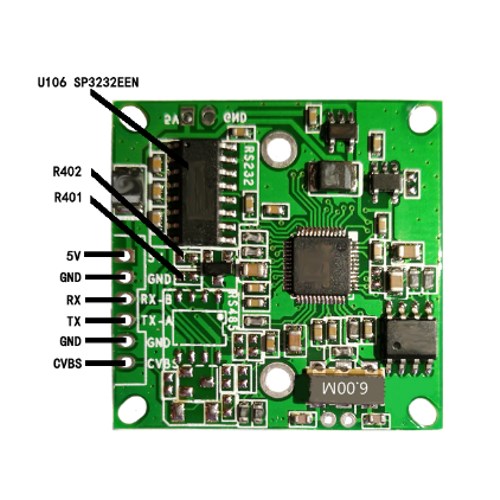
Command instruction :
1、Reset command: 56 00 26 00
Return: 56 00 26 00
2、Photographing command: 56 00 36 01 00
Return: 76 00 36 00 00
3、Read the data length of the captured image: 56 00 34 01 00
Return: 76 00 34 00 04 00 00 XX YY
(XX YY is picture data length, XX is the high byte, YY is the low byte)
4、Read the picture data: 56 00 32 0C 00 0A 00 00 XX XX 00 00 YY YY 00 FF
Return: 76 00 32 00 00 (interval) FF D8. . . . . FF D9 (interval) 76 00 32 00 00
00 00 XX XX - starting address (must be a multiple of 8, generally 00 00)
00 00 YY YY - picture data length (high byte first, then low byte)
Note: JPEG picture file data must begin with FF D8, and end with FF D9.
5、Empty picture cache command: 56 00 36 01 03
Return: 76 00 36 00 00
6、Set camera image compression command: 56 00 31 05 01 01 12 04 XX
Return: 76 00 31 00 00
XX generally is 36 (range: 00 ---- FF)
7、Set the camera image size: (default size: 320 * 240)
320 * 240: 56 00 31 05 04 01 00 19 11
640 * 480: 56 00 31 05 04 01 00 19 00
160 * 120: 56 00 31 05 04 01 00 19 22
Return: 76 00 31 00 00
8、Get into sleep mode: 56 00 3E 03 00 01 01
Return: 76 00 3E 00 00
Exit sleep mode: 56 00 3E 03 00 01 00
Return: 76 00 3E 00 00
9、Modify camera S/N: 56 YY 31 05 04 01 00 06 ZZ
Return: 76 YY 31 00 00
10、Modify initial baud rate: 56 00 31 06 04 02 00 08 XX YY
Return: 76 00 31 00
11、Modify temporary baud rate: 56 00 24 03 01 XX XX
Return: 76 00 24 00 00
.jpg)
Size :
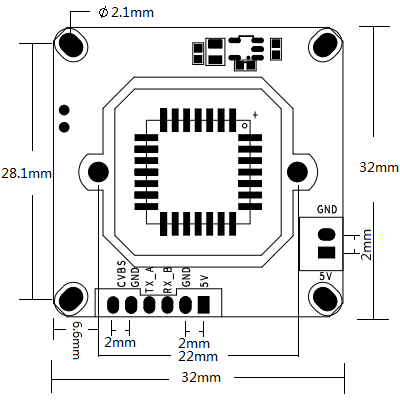
Initialization Process :
1)Power on
2)Delay 2.5 seconds
3)Set the camera image size command ( if change, then execute step 4 )
4)Reset command ( if no step 3, then do not execute this step 4 )
5)Set camera image compression command
Process of taking pictures :
1)Send command of photographing
2)Send command to read the length of images
3)Send command to read the captured image data
4)Send the command to empty cache
5)Again
Application :
1、Security System
2、Image Acquisition System
3、Environmental Monitoring
4、Industrial Field Process Control
5、 Medical Equipment
6、Videophone
7、Power Distribution Network Monitoring
8、 Hydrological Monitoring
9、Oil Field Monitoring System
10、Railway Monitoring
11、Urban Bus and Vehicle Monitoring
12、Highway Monitoring
13、Mine Production Monitoring
14、Forestry Protection Monitoring
15、Surveying and Mapping Exploration Monitoring
16、Intelligent Community Monitoring
17、Logistics Management Monitoring
18、Meteorological Monitoring
19、Industrial Automation Monitoring
Click here to download the zip document
More information about the controller chip VC0706 or VC0703
Join our newsletter today, to get latest product information and promotion code.
 Loading ...
  |
 |
|

|